Sunday, July 19, 2020

3 KAFKA TRY: Practice Kafka on LINUX [ Producer Console -> Single Broker -> Consumer Console ]

3 KAFKA TRY: Practice Kafka on LINUX [ Producer Console -> Single Broker -> Consumer Console ]


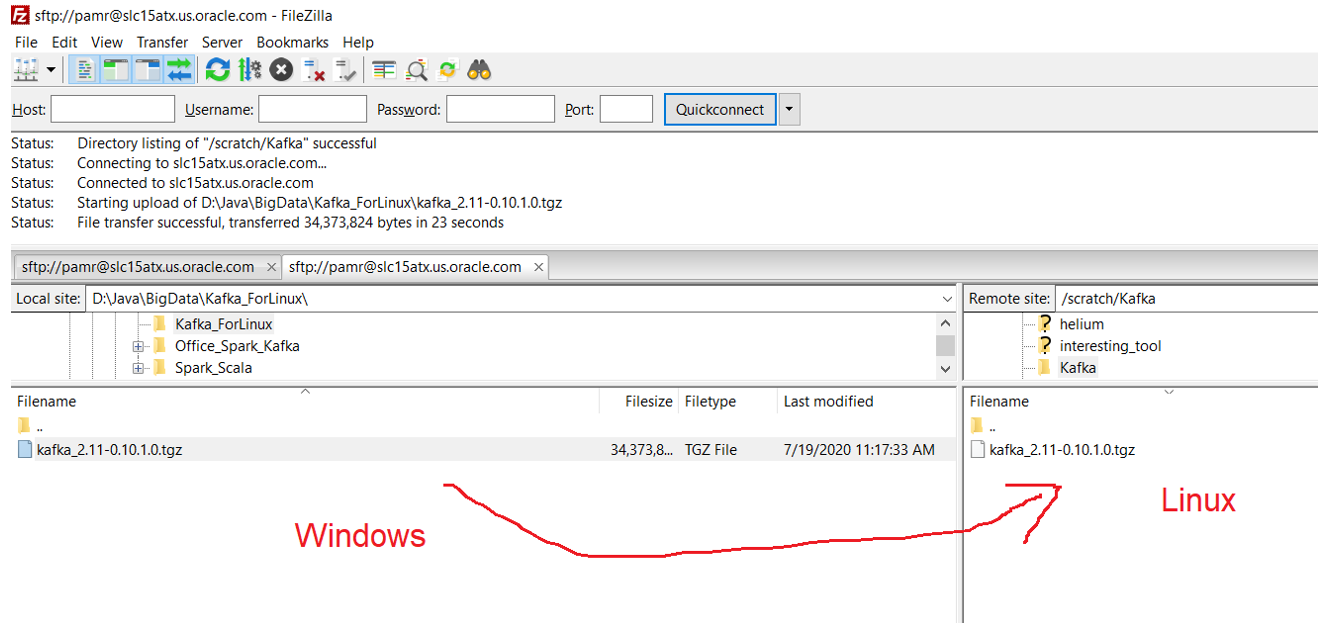
Step1: Download Kafka


tar -xzf kafka_2.11-0.10.1.0.tgz


Step2: Start Zookeeper (Terminal1)

è                           Zookeeper coordinates between brokers
è                          We have to start zookeeper before broker/kafka server starts.

cd kafka_2.11-0.10.1.0


//For Linux bin/zookeeper-server-start.sh
//For Windows bin\windows\zookeeper-server-start

bin/zookeeper-server-start.sh config/zookeeper.properties


    In Windows : while starting zookeeper if we get error like : "Classpath is empty. Please build the project first e.g. by running 'gradlew jarAll'"
    Then fix is - https://medium.com/@praveenkumarsingh/confluent-kafka-on-windows-how-to-fix-classpath-is-empty-cf7c31d9c787


Step3: Start Broker/Kafka server (Terminal2)

For Windows:
bin\windows\kafka-server-start.bat config\server.properties

For Linux:
bin/kafka-server-start.sh config/server.properties


Step4: Create topic (Terminal3)

For windows: 

bin\windows\kafka-topics.bat --create --zookeeper localhost:2181 --replication-factor 1 --partitions 1 --topic myfirstTopic1

For Linux:

bin/kafka-topics.sh --create --zookeeper localhost:2181 --replication-factor 1 --partitions 1 --topic myfirstTopic1


//We can check list of topics created

bin/kafka-topics.sh --list --zookeeper localhost:2181


//Start Producer to send message to myfirstTopic1 (Terminal 3)

bin/kafka-console-producer.sh --broker-list localhost:9092 --topic myfirstTopic1


//Start Consumer to read message to myfirstTopic1 (Terminal 4)

bin/kafka-console-consumer.sh --bootstrap-server localhost:9092 --topic myfirstTopic1


Saturday, July 18, 2020

14. KAFKA : Kafka Theory More...

14. KAFKA : Kafka Theory More...


https://drive.google.com/file/d/1iode3dT2ziL5d0pxoA_294plrUDh6twv/view?usp=sharing


Kafka (Distributed messaging system)

#####################################

- Independent tool nothing to do with HDFS
- runs on its own cluster

Other Messaging systems
------------------------------------
Msgs sending --> kafka store on multiple m/c
JMS -> not distributed
Flume - once msg comes always it write to HDFS

Producer    consumer
----------------------------
        Database
        Application
       
Receiever
-----------
Requirement : Campturing the streamm:

    Expectation : Reciver must run all the time
              Data processing

Normal Spark Receiver/Flume:
---------------------
Normal Spark Receiver runs on commodity hardware, if it goes down one more comes but by that time no one is there to capture the coming data
Normal spark receiver - if data coming rate is high it will burst (same thing happened with indian railway)
Runs on one m/c(JVM), but we can run 2 Reciver, but both receive the data, there will be duplicate copies and uses more resource
If Receiver configure for every 5 sec, process should happen with in that so that it can take another, but if process itself takes 10 sec then ...

Kafka/Rabit-MQueue:
---------------------
Kafka -
Its not Master/slave
Falult tolarance : Replication of messages
what ever msg we send backend it will be stored in binary as file system
Able to handle millioins of message per sec easily (linked in get millions per sec)
Stream processing is available (Kafka confluent) : Later kafka started giving Kafka processing engine also (same like spark)
Retension: by default it preserve the streams for 7 days, and preserve in array of bytes, message will not be removed irrespective of consumer consumed or not, once retension comes then only it will removed
    - retension time is over
    - retension size is over
Messages (csv,txt,avro...)

Header
----------
Body

1 Tweet (1msg should convert to Byte Array)  ->   Kafka(Recieve always as Byte array)   ->   Stream   -----> Poll (Time : 100ms, size: 100kb)
                                                        If message size is > 100kb => will throw error, so that we need to increase message size
                                                        If message size is < 100 kb => other message also come with that

Every Instance of kafka is called => Broker
Every broker should have unique id (eg: B0, B1, B2)
Every broker should have unique IP:Port (eg: IP:9092, IP:9093, IP:9094)
As of now there is NO limitation for number of brokers

Producer1 send message(Topic-"sales") -> will go to Queue(Partition) internally store as file
Producer2 send message(Topic-"sales") ->

Zookeeper => keeps the count of Broker, Broker sends ping to zookeeper server (Heart beat time : Tick tok)
In Kafka => Zookeeper is mandatory, and it comes 1st before broker starts (means we have to start the zookeeper 1st then kafka/broker server)                   
heart beat could be in mili sec also
Znode - How zookeeper maintain all broker is : every object maintain in zookeeper called Znode
 eg : If zookeeper is mainintainig 3 borkers, then 2 Znodes
    Znode - Broker0(Id), Lastupdate,
    Znode - Broker1(Id), Lastupdate,
    Znode - Broker2(Id), Lastupdate, 

Kafka => Min Java 1.6

Images###########
export http_proxy=www-proxy.us.oracle.com:80
export https_proxy=www-proxy.us.oracle.com:80
wget www.google.com
wget http://www-us.apache.org/dist/kafka/2.2.1/kafka_2.12-2.2.1.tgz   //download kafka directly in Workstation

kafka_2.13-2.4.0\config
zookeeper.properties    //zookeeper can be downloaded independent also
    dataDir=/tmp/zookeeper   //(default store in /tmp folder) - Physically maintain all Znode informations...
    clientPort=2181         //on which port zookeeper is running...


server.properties    //every broker one server.properties will be there
    broker.id=0    //mandatory: unique broker should be there, minimum property
    listeners=PLAINTEXT://:9092    //9092 is the port produceer and consumer can communicate
    log.dirs=/tmp/kafka-logs
    log.retention.hours=168
    log.segment.bytes=1073741824   //if segment reaches this size then go that segment to one file  | | | | |

#################################################
//Start zookeeper & kafka server
cd kafka_2.12-2.2.1
bin/zookeeper-server-start.sh config/zookeeper.properties
bin/kafka-server-start.sh config/server.properties

bin/kafka-topics.sh --zookeeper localhost:2181 --list

//Below command will fail bez replication factor is > number of brokers
bin/kafka-topics.sh --zookeeper localhost:2181 --create --topic MyFirstTopic --partitions 3 --replication-factor 2  

bin/kafka-topics.sh --zookeeper localhost:2181 --create --topic MyFirstTopic --partitions 3 --replication-factor 1

bin/kafka-topics.sh --zookeeper localhost:2181 --describe --topic MyFirstTopic

//increasing the partition for particular topic
//we cannot decrease the partition
//even when producer/consumer running we can increase the partitions
bin/kafka-topics.sh --zookeeper localhost:2181 --alter --topic MyFirstTopic --partitions 5

For testing - console based Producer/Consumer
---------------------------------
Terminal-1 (Producer)
--------------------
bin/kafka-console-producer.sh --broker-list localhost:9092 --topic MyFirstTopic

Terminal-2 (Consumer)
---------------------
bin/kafka-console-consumer.sh --bootstrap-server localhost:9092 --topic MyFirstTopic

#################################################

for Every parttion there is a leader selected, only leader will get and give on demand
Eg: if 3 borkers are there
    partition0 -> 1 Leader(Brok2), 2 followers
    partition1 -> 1 Leader(Brok1), 2 followers
    partition3 -> 1 Leader(Brok3), 2 followers


Kafka => the order of message consumer receives will not be in same order, but producer receives in correct order

Kafka monitoring tool => just to monitor what is there in Kafka partition

Producer has choice want acknoledge   ->   Leaders read
    - 0 : Fast : (Fire and forget)
    - 1 : Slow: (If Leader reads fine, then Leader writes 1)
    - All : Slowest : (If Leader reads fine, write to Lea-der and followers then Leader writes All) - Banking sector

Ways to Send message from Producer

Topic : "MyMessage"
---------

Message - Hello

Message - India, Hello
      key.hashcode % no of partition
        100  % 4 = 0    -- will go to Partition P0

       Pak, hello
        40 % 4 = 1      -- will go to Partition P1

       Nepal, hello
        40 % 4 = 1      -- will go to Partition P1

Message - K, V, P#

Message - K, V, P#, TS


Consumer maintains below 2 offset, so that for next reading cosumer can ask...
############################################

1> Read offset
2> Commit offset

Status of Broker is maintained by zookeeper


15. KAFKA : Kafka Theory More...

15. KAFKA : Kafka Theory More...


Custom Producer
#####################################-
In VMWare Workstation -> Kafka VM
Start Zookeeper
Start Broker
Create topic "MyFirstTopic"
Start consumer with that topic "MyFirstTopic"

Open Eclipse  (create Custom Producer and Run)
-----------------------------------------------
-> give workspace
-> Create normal Java Project "KafkaProject"
-> Create java class -> SimpleProducer.java
-> take some java files from -> workspaceKafka-20200110T040943Z-001\workspaceKafka\MyKAfkaProject\src\main\java\KafkaCode
-> copy SimpleProducer.java to your eclipse SimpleProducer.java
-> Make sure in code : topic name and Port
-> Run java Application
-> Verify in consumer terminal whether value is appearing or not
    //we should see "Value-2" in consumer terminal


Kafka Cluster
-------------------

1 Node - 1 Broker

1 Node - Multiple brokers

Multiple Node - Multiple Brokerss


We will try - 1 Node - Multiple brokers
#####################################-
conf/server.properties
    Broker-id   (broker.id=0)
    log-dir     log.dirs=/tmp/kafka-logs
    ip:port     (listeners=PLAINTEXT://:9092)

conf/server1.properties
    Broker-id  (broker.id=1)
    log-dir     log.dirs=/tmp/kafka-logs2
    ip:port    (listeners=PLAINTEXT://:9093)

conf/server2.properties
    Broker-id  (broker.id=2)
    log-dir     log.dirs=/tmp/kafka-logs3
    ip:port    (listeners=PLAINTEXT://:9094)

------------------------------------------------------------
bin/kafka-server-start.sh config/server1.properties
bin/kafka-server-start.sh config/server2.properties

//create topic with replication factor - 3 (bez there are 3 brokers running it can replicate in all 3)
bin/kafka-topics.sh --zookeeper localhost:2181 --create --topic NewTopic --partitions 5 --replication-factor 3

bin/kafka-topics.sh --zookeeper localhost:2181 --describe --topic NewTopic

bin/kafka-console-consumer.sh --bootstrap-server localhost:9092 --topic NewTopic


-----------------------------------------------------------


Producer Flow (SimpleProcedure.java)
#####################

Serializer - based on key_value
    we can mention which Serializer to do serialization (we use kafka serializer)
    - convert to Byte Arrray


Producer(props)
ProducerRecord(topicName, key, value)
send(ProdRec)

//even we can pass Partition# in constructor
//parttion# where it has to go will be decided based on key  (key.hashCode)
    key.hashcode * no of partition


//Future object -SynchronousProducer.java (get())
#####################################-
 -> get() -> returns Future object wchich contains metadata of msg which partition it went in...
    metadata.partition()
    metadata.offset()

    -----------------------------------------------
    Key is : Key1
    Message is sent to Partition no 4 and offset 1
    SynchronousProducer Completed with success.
    ----------------------------------------------

Change the key -> so that it will got to different partition, bez which partition decides based on key

    //changed key to -> String key = "Key12345";

    -----------------------------------------------
    Key is : Key12345
    Message is sent to Partition no 0 and offset 0
    SynchronousProducer Completed with success.
    ----------------------------------------------


//Custom Serializer -
#####################################-
Supplier.java
SupplierSerializer.java
SimpleProducer.java

SupplierDeserializer.java
SupplierConsumer.java

//create topic
bin/kafka-topics.sh --zookeeper localhost:2181 --create --topic SupplierTopic --partitions 5 --replication-factor 3


-> Eclipse -> Run SupplierConsumer.java
-> Eclipse -> Run SimpleProducer.java

        ---------------------------------------------------------
        Supplier id= 101 Supplier  Name = Xyz Pvt Ltd. Supplier Start Date = Fri Apr 01 00:00:00 EDT 2016
        Supplier id= 102 Supplier  Name = Abc Pvt Ltd. Supplier Start Date = Sun Jan 01 00:00:00 EST 2012
        ---------------------------------------------------------

$$$$$$$$$$ IMAGE


//Custom Partitioner -
//API - Partitioner

#####################################-
1. //Default Partitioner - (Topic, V) => Based on Round robin msg will go to partition in broker

2. Topic, K, V
    k.hashCode() % no of Partition

3. Topic, k, V, P#

4. Custom partition
    Eg: if input has more text as "AAA" (40% of overall data)
    if we go with 3rd option - all "AAA" will go to only that partition and it will be havier (40% of over all data)
    So we go with custom logic to then we can tell "AAA" can go to to 3 partitions instead of 1


Custom partition
#####################################-
SensorPartitioner.java
SensorProducer.java


//create topic with 10 partitions
bin/kafka-topics.sh --zookeeper localhost:2181 --create --topic SensorTopic --partitions 10 --replication-factor 3

bin/kafka-console-consumer.sh --bootstrap-server localhost:9092 --topic SensorTopic

-> Eclipse -> Run SensorProducer.java


Zookeeper Monitor
#####################################-
bin/zookeeper-shell.sh localhost:2181

//You will see : WatchedEvent state:SyncConnected type:None path:null
//type below ls commands to check ids, topics, brokers etc...
ls /brokers/ids
    [0, 1, 2]
ls /brokers
    [ids, topics, seqid]
ls /brokers/topics
    [NewTopic, SensorTopic, SupplierTopic, MyFirstTopic, __consumer_offsets]
ls /brokers/topics/NewTopic
    [partitions]
ls /brokers/topics/NewTopic/partitions
    [0, 1, 2, 3, 4]


Consumer
##########################
- mandatory to assign Consumer to Consumer Group (to increase the scalablity)
- By default consumer gets data from all partitions.
- If partion is removed or Consumer is added to group => Activity will be triggerd called => Rebalancing with in single Consumer Group
    Rebalancing => algorithm called - "partitionAssigner" (RoundRobin, Range)
    After Rebalancing -> partitions may go to different consumer which it was working earlier
- 2 consumer with in same consumer group operate on single Partition (eg: P0)-> is not possible, but other consumer from other consumer group can operate

 Group Coordinator
----------------
Kafka side : 1 broker for 1 consumer group will be - Group leader
Consumer side : from each consumer group 1 consumer acts like Groupo leader, usually 1st consumer

From consumer group - all consumer will ping Broker (group leader) in kafka
Group Leader from consumer group will trigger "PartitionAssigner"
Broker (Group Leader) => ask for Rebalancer, bez Broker gets the heartbeats from each consumer, if earlier consumers in consumer group is 3, and if we add 1 more consumer in cosnumer group then heart beat it gets is 4, so it initiates Rebalancing => Then Group Leader decides which consumer works on which partition

Offset
-------
Current offset: current consumer should not repeat same msg, for that we manage current offset

Committed offset:After rebalancing new consumer should not read message again so committed offset maintains.

1. Auto commit  => ms : 5 sec  (every after 5 sec it does autocommit)
2. Manual commit
        50 ------------60
        |        |
       
    assume 6 from 50 - 60 is processed and Rebalncing happens the 6 is already read and once new consumer comes then it will start from 50
    For this we can have RebalanceListner -> and once Rebalance triggers -> write what ever read data (6 msg) -> commit
                onPartitionsAssigned(), onPartitionsRevoked()

RebalanceListner with Consumer
###############################################################
//Create 10 Partitions - RandomProducerTopic
bin/kafka-topics.sh --zookeeper localhost:2181 --create --topic RandomProducerTopic --partitions 10 --replication-factor 3


Eclipse -> Run -> RandomConsumer.java
    You will see all 10 partitions printing

Eclipse -> Run -> RandomConsumer.java (Another instance)
    You will see all 5 partitions printing    (Once New consumer is added, RebalanceListner will trigger and assign 5 partition to consumer1 and 5 partitions to consumer2

        Following Partitions Revoked ....
        Following Partitions commited ....
        Following Partitions Assigned ....
        3,
        2,
        1,
        0,
        4,

Eclipse -> Run -> RandomProducer.java
        //it will send data contineously...
       

Cluster Mirroring
#############################
- Cluster1 - Cluster2 (copy of cluster1)

3 Options we can do mirroring
-------------------------------
1. from 3 kafka cluster -> pour to central cluster for analysis
2. exact copy of another
3. /bin/kafka-mirroring.sh


create copy zookeeper.properties -> zookeeper1.properties
    clientPort=2182

create copy of server.properties  -> serverzoo2.properties
    listeners=PLAINTEXT://:9095
    zookeeper.connect=localhost:2182

cd kafka_2.12-2.2.1
bin/zookeeper-server-start.sh config/zookeeper1.properties
bin/kafka-server-start.sh config/serverzoo2.properties

bin/kafka-topics.sh --zookeeper localhost:2182 --create --topic MyNewClusterTopic --partitions 3 --replication-factor 1

bin/kafka-topics.sh --zookeeper localhost:2182 --list
bin/zookeeper-shell.sh localhost:2182
    ls /brokers/ids
    ls /brokers
    ls /brokers/topics

Tuesday, January 14, 2020

13. KAFKA : Sample Program11 : Cluster Mirroring

13. KAFKA : Sample Program11 : Cluster Mirroring


Cluster Mirroring
#############################
- Cluster1 - Cluster2 (copy of cluster1)

3 Options we can do mirroring
-------------------------------
1. from 3 kafka cluster -> pour to central cluster for analysis
2. exact copy of another
3. /bin/kafka-mirroring.sh


create copy zookeeper.properties -> zookeeper1.properties
clientPort=2182

create copy of server.properties  -> serverzoo2.properties
listeners=PLAINTEXT://:9095
zookeeper.connect=localhost:2182

cd kafka_2.12-2.2.1
bin/zookeeper-server-start.sh config/zookeeper1.properties
bin/kafka-server-start.sh config/serverzoo2.properties

bin/kafka-topics.sh --zookeeper localhost:2182 --create --topic MyNewClusterTopic --partitions 3 --replication-factor 1

bin/kafka-topics.sh --zookeeper localhost:2182 --list 
bin/zookeeper-shell.sh localhost:2182
ls /brokers/ids
ls /brokers
ls /brokers/topics


12. KAFKA : Sample Program10 : Zookeeper Monitor

12. KAFKA : Sample Program10 : Zookeeper Monitor


Zookeeper Monitor
#####################################-
bin/zookeeper-shell.sh localhost:2181

//You will see : WatchedEvent state:SyncConnected type:None path:null
//type below ls commands to check ids, topics, brokers etc...
ls /brokers/ids
[0, 1, 2]
ls /brokers
[ids, topics, seqid]
ls /brokers/topics
[NewTopic, SensorTopic, SupplierTopic, MyFirstTopic, __consumer_offsets]
ls /brokers/topics/NewTopic
[partitions]
ls /brokers/topics/NewTopic/partitions
[0, 1, 2, 3, 4]


11. KAFKA : Sample Program9 : Consumer : RebalanceListner with Consumer

11. KAFKA : Sample Program9 : Consumer : RebalanceListner with Consumer


Consumer
##########################
- mandatory to assign Consumer to Consumer Group (to increase the scalablity)
- By default consumer gets data from all partitions.
- If partion is removed or Consumer is added to group => Activity will be triggerd called => Rebalancing with in single Consumer Group
Rebalancing => algorithm called - "partitionAssigner" (RoundRobin, Range)
After Rebalancing -> partitions may go to different consumer which it was working earlier
- 2 consumer with in same consumer group operate on single Partition (eg: P0)-> is not possible, but other consumer from other consumer group can operate

 Group Coordinator
----------------
Kafka side : 1 broker for 1 consumer group will be - Group leader
Consumer side : from each consumer group 1 consumer acts like Groupo leader, usually 1st consumer

From consumer group - all consumer will ping Broker (group leader) in kafka
Group Leader from consumer group will trigger "PartitionAssigner"
Broker (Group Leader) => ask for Rebalancer, bez Broker gets the heartbeats from each consumer, if earlier consumers in consumer group is 3, and if we add 1 more consumer in cosnumer group then heart beat it gets is 4, so it initiates Rebalancing => Then Group Leader decides which consumer works on which partition

Offset
-------
Current offset: current consumer should not repeat same msg, for that we manage current offset

Committed offset:After rebalancing new consumer should not read message again so committed offset maintains.

1. Auto commit  => ms : 5 sec  (every after 5 sec it does autocommit)
2. Manual commit
50 ------------60
| |

assume 6 from 50 - 60 is processed and Rebalncing happens the 6 is already read and once new consumer comes then it will start from 50
For this we can have RebalanceListner -> and once Rebalance triggers -> write what ever read data (6 msg) -> commit
onPartitionsAssigned(), onPartitionsRevoked()


RebalanceListner with Consumer
###############################################################
//Create 10 Partitions - RandomProducerTopic
bin/kafka-topics.sh --zookeeper localhost:2181 --create --topic RandomProducerTopic --partitions 10 --replication-factor 3


Eclipse -> Run -> RandomConsumer.java
You will see all 10 partitions printing

Eclipse -> Run -> RandomConsumer.java (Another instance)
You will see all 5 partitions printing (Once New consumer is added, RebalanceListner will trigger and assign 5 partition to consumer1 and 5 partitions to consumer2

Following Partitions Revoked ....
Following Partitions commited ....
Following Partitions Assigned ....
3,
2,
1,
0,
4,

Eclipse -> Run -> RandomProducer.java
//it will send data contineously...


10. KAFKA : Sample Program8 : Consumer : Manual Consumer

10. KAFKA : Sample Program8 : Consumer : Manual Consumer


package KafkaCode;


import org.apache.kafka.clients.consumer.ConsumerRecords;
import org.apache.kafka.clients.consumer.KafkaConsumer;

import java.util.Arrays;
import java.util.Properties;

import org.apache.kafka.clients.consumer.ConsumerRecord;
public class ManualConsumer {
public static void main(String[] args) throws Exception{

        String topicName = "SupplierTopic";
        String groupName = "SupplierTopicGroup";

        Properties props = new Properties();
        props.put("bootstrap.servers", "localhost:9092,localhost:9093");
        props.put("group.id", groupName);
        props.put("key.deserializer", "org.apache.kafka.common.serialization.StringDeserializer");
        props.put("value.deserializer", "SupplierDeserializer");
        props.put("enable.auto.commit", "false");

        KafkaConsumer<String, Supplier> consumer = null;

        try {
            consumer = new KafkaConsumer<>(props);
            consumer.subscribe(Arrays.asList(topicName));

            while (true){
                @SuppressWarnings("deprecation")
ConsumerRecords<String, Supplier> records = consumer.poll(100);
                for (ConsumerRecord<String, Supplier> record : records){
                    System.out.println("Supplier id= " + String.valueOf(record.value().getID()) + " Supplier  Name = " + record.value().getName() + " Supplier Start Date = " + record.value().getStartDate().toString());
                }
                consumer.commitAsync();
            }
        }catch(Exception ex){
            ex.printStackTrace();
        }finally{
            consumer.commitSync();
            consumer.close();
        }
    }
}